macOS · private beta

Force-unwrap,
responsibly.

ForceUnwrapp is the native macOS workbench for running Claude Code and Codex on your Swift & iOS projects. Open a folder, approve a plan, and let an agent work — while it verifies designs, watches dependencies, and never gets to rm -rf your home directory.

You're on the list — we'll email you when a seat opens.
Local-first — code never leaves your Mac Native Xcode toolchain
Fatal error: found nil while unwrapping
applied · 5 files · $0.42
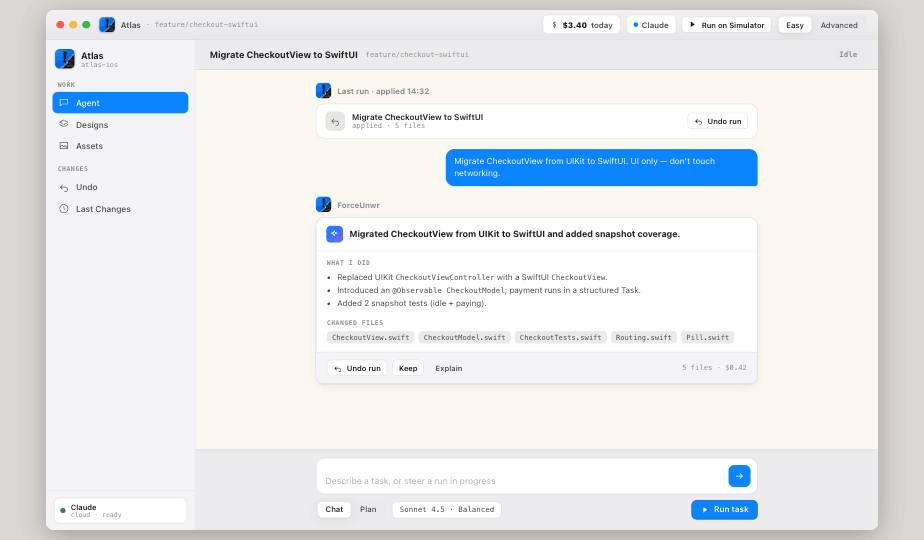
ForceUnwr workspace — an agent run applied to five files
Drives the agents you already use Claude Code OpenAI Codex Run on Simulator Easy & Advanced modes
The workbench

One window. Two ways to work.

Start simple — type a task, watch it run, undo if you don't like it. Flip to Advanced when you want the run inspector, context packet, approvals, and cost on screen.

Easy mode

Describe a task. Approve the result.

A focused chat over your project folder. The agent reports exactly what it did and which files changed — and a single Undo run puts everything back.

  • Plain-language tasks — "migrate CheckoutView to SwiftUI, UI only."
  • What-I-did summaries with the exact changed-files list.
  • One-click Undo & Keep on every run.
Easy mode workspace
WS · Easy mode — run applied, 5 files, $0.42
Advanced mode

The whole run, on screen.

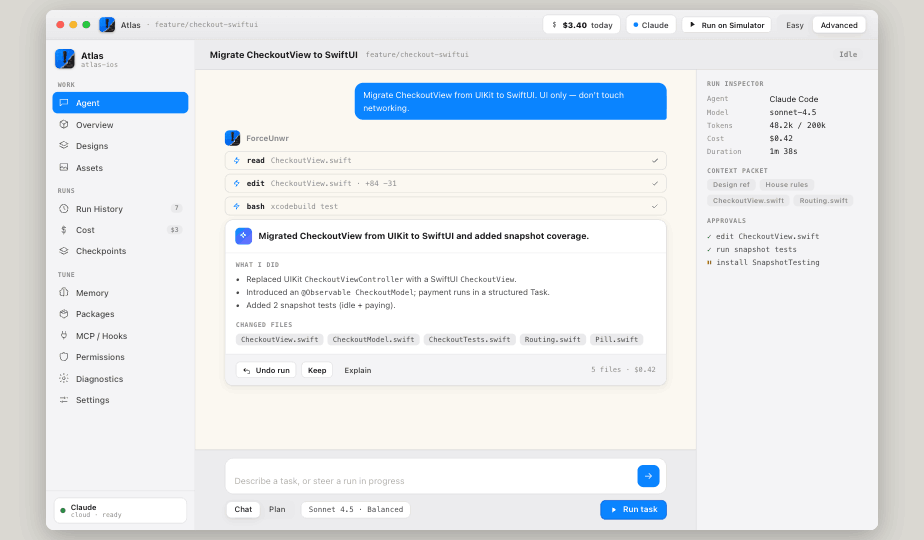
Every tool call as it happens — reads, edits, builds. A live Run Inspector shows the model, tokens, cost and the exact context packet the agent was given.

  • Tool-by-tool stream — read, edit ±lines, bash, test.
  • Context packet — see precisely what was sent to the model.
  • Inline approvals for anything that touches the system.
Advanced mode workspace with run inspector
WS · Advanced mode — Run Inspector + Context Packet
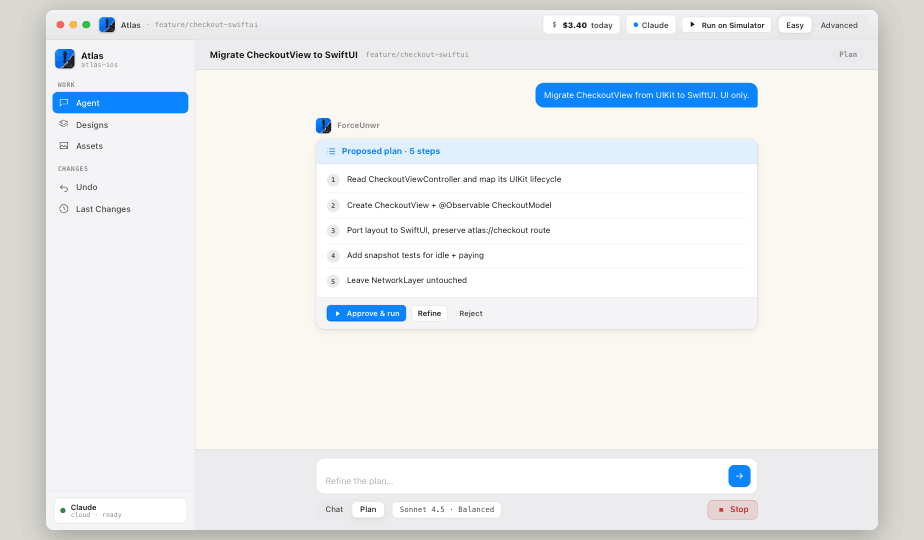
Plan mode — proposed plan in 5 steps
CHAT · Plan mode — review before a single file moves
Plan mode

It proposes. You approve.

Ask for a plan first and the agent maps out its steps — read, refactor, port, test — before it writes anything. Approve & run, refine the plan, or reject it outright.

  • Numbered, editable steps you can steer before they execute.
  • Pick the model — Sonnet, Codex, balanced or careful.
  • Steer mid-run — queue follow-ups while it works.
Designs & Storybook

Built it to spec? Prove it.

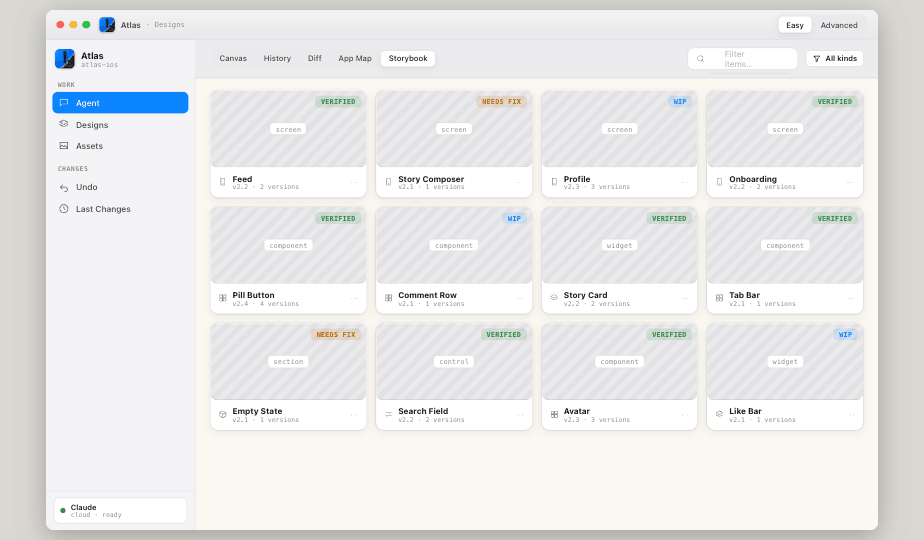
Every screen, component and widget lives in a Storybook with a verification status. ForceUnwrapp diffs the running build against your design reference and writes the fix prompt for you.

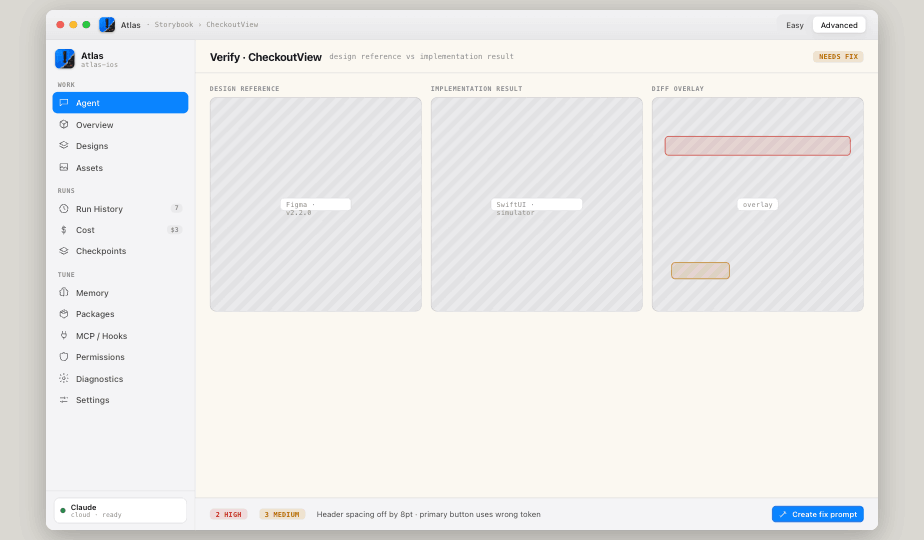
Verify — design reference vs implementation result with diff overlay
VERIFY · reference vs result — 2 high, 3 medium
Verification

Reference, result, diff overlay.

Put the Figma reference next to the SwiftUI render and the pixel diff on top. ForceUnwrapp flags the spacing that's 8pt off and the button using the wrong token — then turns it into an editable fix prompt.

  • Storybook of every surface — verified, needs-fix, WIP.
  • One-click fix prompt generated from the diff findings.
  • Variants & versions — capture, compare, promote to main.
Storybook of screens, components and widgets with verification badges
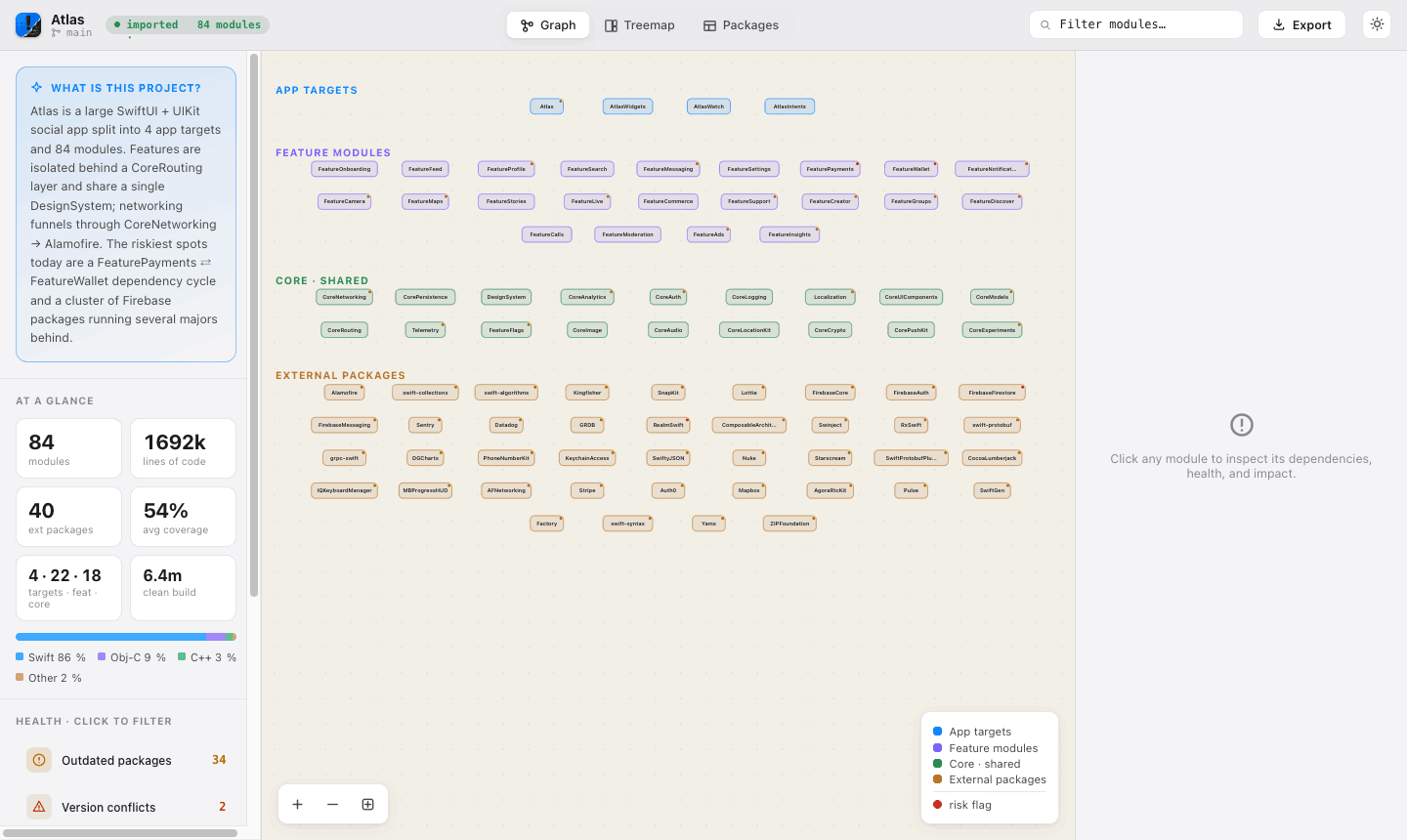
Codebase overview

The whole project, in one map.

App targets, feature modules, shared core and every external package — drawn as a live dependency graph. Spot the risky cycles, the outdated packages, and the version conflicts before the agent touches them.

Dependency graph — 84 modules across app targets, features, core and packages
84
modules mapped
Graph · Treemap · Packages
three views
34 + 2
outdated · conflicts
Guardrails

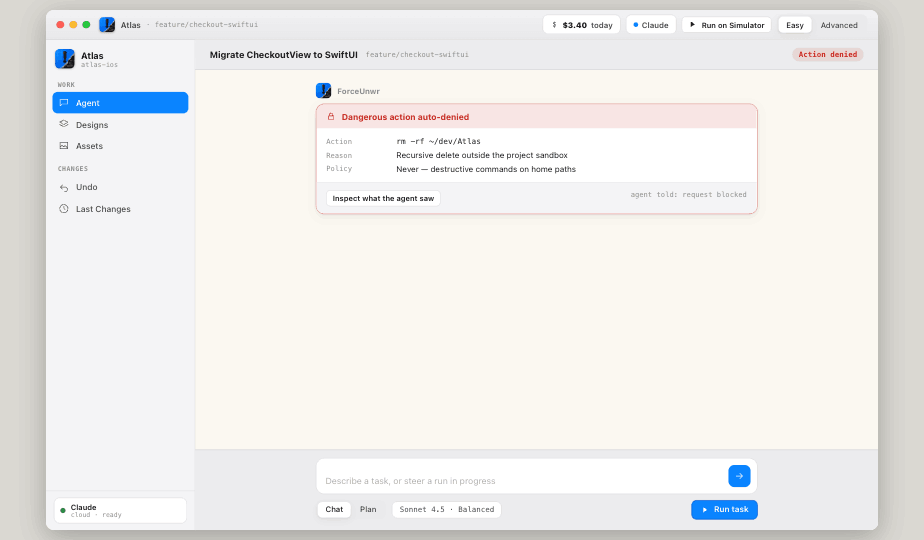
It can't rm -rf what it can't reach.

Destructive commands outside the project sandbox are auto-denied — no prompt, no exceptions. Risky-but-reasonable actions pause for your approval, and every decision is logged.

  • Hard policies — never run destructive commands on home paths.
  • Inspect what the agent saw on any blocked action.
  • Checkpoints wrap every write — restore in one click.
Dangerous action auto-denied — rm -rf outside the project sandbox
APPROVAL · request blocked — outside sandbox
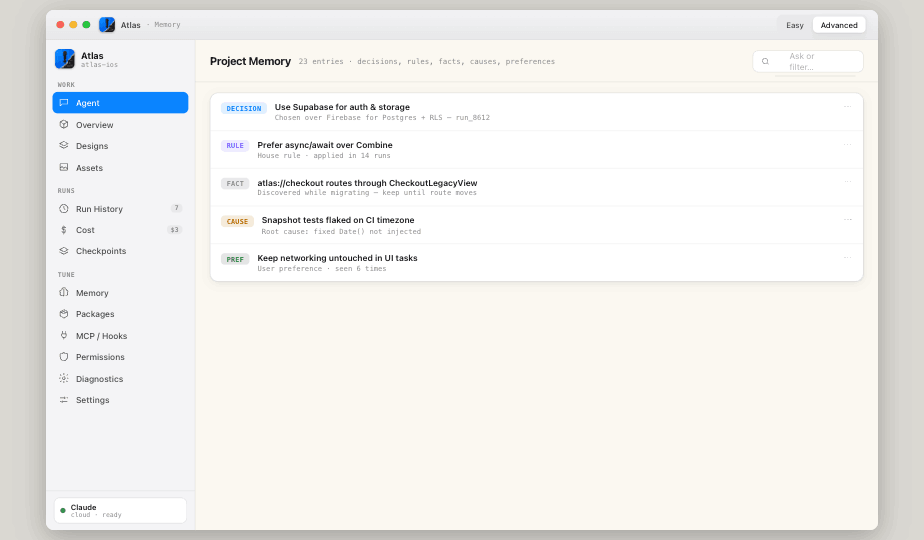
Project memory

It remembers the decisions.

Decisions, house rules, facts, root causes and preferences — captured as the project evolves so the next run already knows "we use Supabase" and "keep networking untouched in UI tasks."

  • Typed entries — decision, rule, fact, cause, preference.
  • Auto-applied as house rules across future runs.
  • Conflict review when a new decision contradicts an old one.
Project memory — decisions, rules, facts, causes and preferences
MEMORY · 23 entries learned from your runs
Everything in the box

A real workbench, not a chat box.

The capabilities that turn an agent from a toy into something you'd let near a shipping app.

Run History & Cost

Every run logged with applied / reverted / partial status, files touched, and dollars spent — per run and per day.

7 runs · $3.40 today

Checkpoints

Automatic restore points around every agent write. Roll the whole project back to before a run with one click.

restore · undo

App Map

The navigation graph of your app — screens, routes and transition types — kept in sync and versioned alongside your designs.

routes · transitions

Asset Library

Every image, icon and generated asset in one place — with duplicate review and import checks before anything lands.

import review

MCP · Hooks · Plugins

Wire in your own MCP servers and lifecycle hooks. Extend what the agent can reach without leaving the app.

extensible

Run on Simulator

Build and launch in the iOS Simulator straight from the toolbar — see the change running, not just the diff.

xcodebuild

Permissions & Audit

Per-action risk classification with a full permission history — see what was allowed, denied, and why.

risk classified

Packages & Doctor

Track every dependency, surface outdated majors and version conflicts, and run a toolchain doctor when builds drift.

40 ext packages

Offline-capable

Local-first by design. Your code stays on your Mac, and the parts that don't need the network keep working offline.

private by default
Private beta · seats are limited

Let an agent in.
Keep the keys.

ForceUnwrapp is rolling out to a small group of iOS teams. Drop your email and we'll send a build the moment a seat opens up.

~40 builds left in this wave · macOS 14+
You're on the list — check your inbox.